
How to make the 24k Magic AI dance video
Put the two of you on the ship
One photo in Deck dancer, one in Corridor dancer. New accounts can watch a free 2-second preview first.
Who dances
Add both photos
See the first 2 seconds free. The full video is 900 credits.
One person per photo, face clearly visible, full body if you have it. JPG, PNG or WebP up to 10 MB.
- No app
- No watermark
- Credits back if a video fails
The 24k Magic AI dance video is the cruise-ship clip where one of you dances across the sunny deck to Bruno Mars and the other leans out of a corridor doorway for the last close-up. You need two photos, one for each role. This guide covers which photo should take which role, the steps, posting it on TikTok and Reels, and what to change when a face looks off.
- You need: two photos, one person in each
- You get: 15 seconds, 16:9, 720p, song included
- Price: from $9.90 for one video, no subscription
Three ways to make the 24k Magic AI dance
Pick by what you have: a ship and a friend who can dance, time to write and retry a prompt, or two photos.
| Film it yourselfWith a phone and a friend | Write an AI promptIn an AI video tool that takes photosGet the prompt | Two photos hereNo app, no promptUse our photos | |
|---|---|---|---|
| What you need | A deck or something like it, someone to film, and the routine learned | Two photos, a long prompt and a few tries | Two clear photos, one person in each |
| What comes back | Your own performance, as good as your moves | A new ship, new moves and new cuts on every try | The cruise-ship clip with its six camera cuts, starring you two |
| Who appears when | Whatever you plan | Whatever the tool makes of your prompt | Fixed: Deck dancer from the start, Corridor dancer from about 10 seconds |
| The song | Add it in TikTok when you post | Depends on the tool | Already under the video |
What you need for the 24k Magic AI dance
Two photos and an email address. Each person takes the face, hair and top from their own photo, so choose the photos with that in mind.
- Photos
- Two, one per role
- Both roles need a photo before Generate video unlocks. One person per photo; a group shot confuses who is who.
- Each photo
- Sharp, front-facing, even light
- The whole face visible, no sunglasses, hat brim or hand over it. A waist-up photo is fine; the legs, shorts, socks and sneakers come from the clip.
- What you wear
- The top in your photo
- There is no outfit picker. Want to dance in a velvet jacket or your team shirt? Use a photo where you are wearing it.
- Who can be in it
- You, or adults who said yes
- No public figures, no one under 18, and not Bruno Mars. You tick a box before Generate video to confirm it.
- An account
- Sign in with an email code
- Type your email, enter the code we send, and you are in. New accounts get a free 2-second preview before they pay.
Three steps from two photos to a 24k Magic AI dance
Decide who is who first; the rest is one button.
- 1
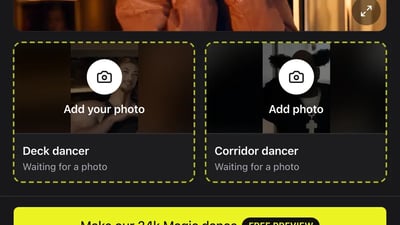
Choose who dances on deck
Decide which of you carries the routine and which one gets the doorway cameo at the end, then pick a clear photo of each.
- 2
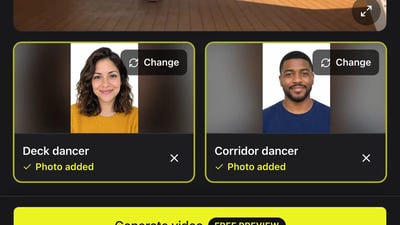
Fill the two role cards
Put the main dancer in Deck dancer and the cameo in Corridor dancer. Sign in with an email code when the site asks.
- 3
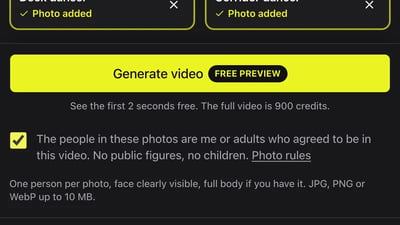
Press Generate, then come back
Tick the consent box and press Generate video. You don't need to keep the tab open: the finished MP4 waits in My videos for 30 days, ready to download or share as a link.
Deck or doorway: who goes where
The two roles are not equal. Deck dancer is on screen for most of the clip; Corridor dancer gets the punchline and the final close-up.
- 0 to 2 seconds
- Deck dancer, close-up
- A smile and chest taps in the lounge. This face fills the frame, so give Deck dancer a sharp photo.
- 2 to 10 seconds
- Deck dancer, on deck
- Two wide shots and a sneaker close-up of the routine. This is where the shorts, socks and sneakers from the clip show.
- 10 to 13.5 seconds
- Corridor dancer arrives
- Leans out from behind a door and dances in the doorway, with Deck dancer still going far behind.
- 13.5 to 15 seconds
- Corridor dancer, close-up
- Touches their head and looks into the camera. The last face people see.
Post your 24k Magic AI dance on TikTok and Reels
The file is ready to post as it is. These details decide whether it gets watched to the end.
- 1
Keep the clip's own sound
The song already plays under the video. If you pick a sound from TikTok's library anyway, turn the clip's own volume down so the two don't play over each other.
- 2
Crop it for vertical if you like
It is widescreen 16:9. Posted as it is, TikTok and Reels show it with bars above and below; to fill the screen, crop it to 9:16 in the editor and keep the dancer in the middle.
- 3
Set up the ending in the caption
"Wait for the doorway" or "@friend showed up late again" gives people a reason to watch to the last second, and tagging the corridor dancer puts it on their profile too.
- 4
Switch on the AI label
TikTok has an AI-generated content toggle in the post settings, and Instagram asks when you upload. Turn it on; it is an AI video of real people.
When something looks off in your 24k Magic AI dance
Nearly every problem traces back to one of the two photos. Change one thing per try; a new try costs the same as a new video.
A face does not look like the person
- Try this next
- Use a sharper photo of that person, facing the camera, in even light, with nothing covering the face
- Keep as is
- The other person's photo
The wrong person dances on deck
- Try this next
- The photo in Deck dancer always takes the routine. Move each photo to the other card and generate again
- Keep as is
- The photos themselves
The shorts, socks or sneakers are not yours
- Try this next
- Expected with a waist-up photo: the top comes from your photo, and the deck shots keep the clip's legs and sneakers
- Keep as is
- The face, if it looks right
The video did not finish
- Try this next
- Press Generate video again. The credits for a failed run come back to your balance automatically
- Keep as is
- Everything else
Making the 24k Magic AI dance: questions
Not here. Both roles need a photo before you can press Generate video. Use a photo of a friend, a sibling or a parent who agreed to be in it.
Yes. Move each photo to the other card and generate again.
You can try it once. New accounts get 30 free credits when they sign up, enough for one 2-second preview of the lounge close-up; it is watch-only. The full 15-second video starts at $9.90, paid once.
It comes out widescreen 16:9, like the original clip. Crop it to 9:16 in TikTok or CapCut if you want it to fill a phone screen.
We don't know of an official one. Here you don't need an app or a template: add two photos in the browser.
No. The ship, the moves, the cuts and the timing come from the clip. If you would rather use another AI video tool, the 24k Magic AI dance prompt page has one we tested.
A few minutes. You can close the tab; the video is waiting in My videos when it is done.
More 24k Magic AI dance guides
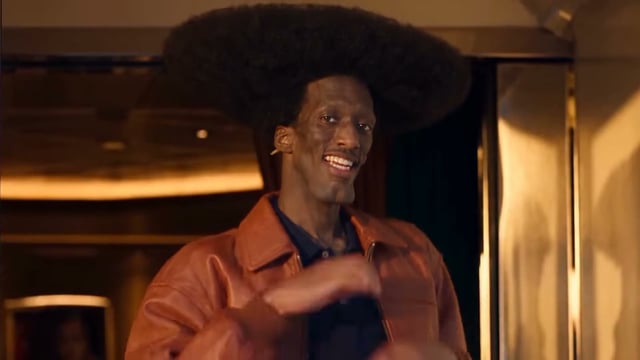
What is the 24k Magic AI dance trend?
The 24k Magic AI dance trend is a short AI-made music video set to Bruno Mars's "24K Magic": a dancer with orange pigtails and headphones grins into the camera in a cruise-ship lounge, then dances across the sunny deck, and a second dancer leans out of a corridor doorway for the last close-up. In early November 2026 people started making their own versions with themselves and their friends in those two spots.
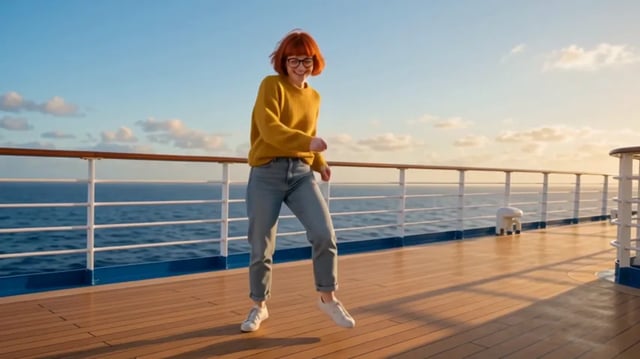
24k Magic AI dance prompt
Copy the 24k Magic AI dance prompt below into an AI video tool that takes two reference photos. We ran it once in Wan 3.0 with two portraits, so you can see what it got right, what it missed and what to change next. Rather not write a prompt? Make it here from two photos; the ship, the moves and every camera cut come from the trend's own clip.
Deck or doorway, decide and press Generate
Two photos, one cruise ship.